Alternating Labels for Your Products
Multiple label designs combined efficiently within a single print run
- Ideal for machine processing
- Cost-effective production
- Multiple label designs in one order
- Custom shapes and sizes
- High-quality digital printing
- Express production in 24 or 48 hours
- Front and back label on the same roll
What are Alternating Labels?
Alternating means that front and back labels are printed alternately or consecutively on the roll in one job. This method is particularly suitable if your products are processed mechanically, that is if front and back labels are applied simultaneously in one pass.
What is the Process?
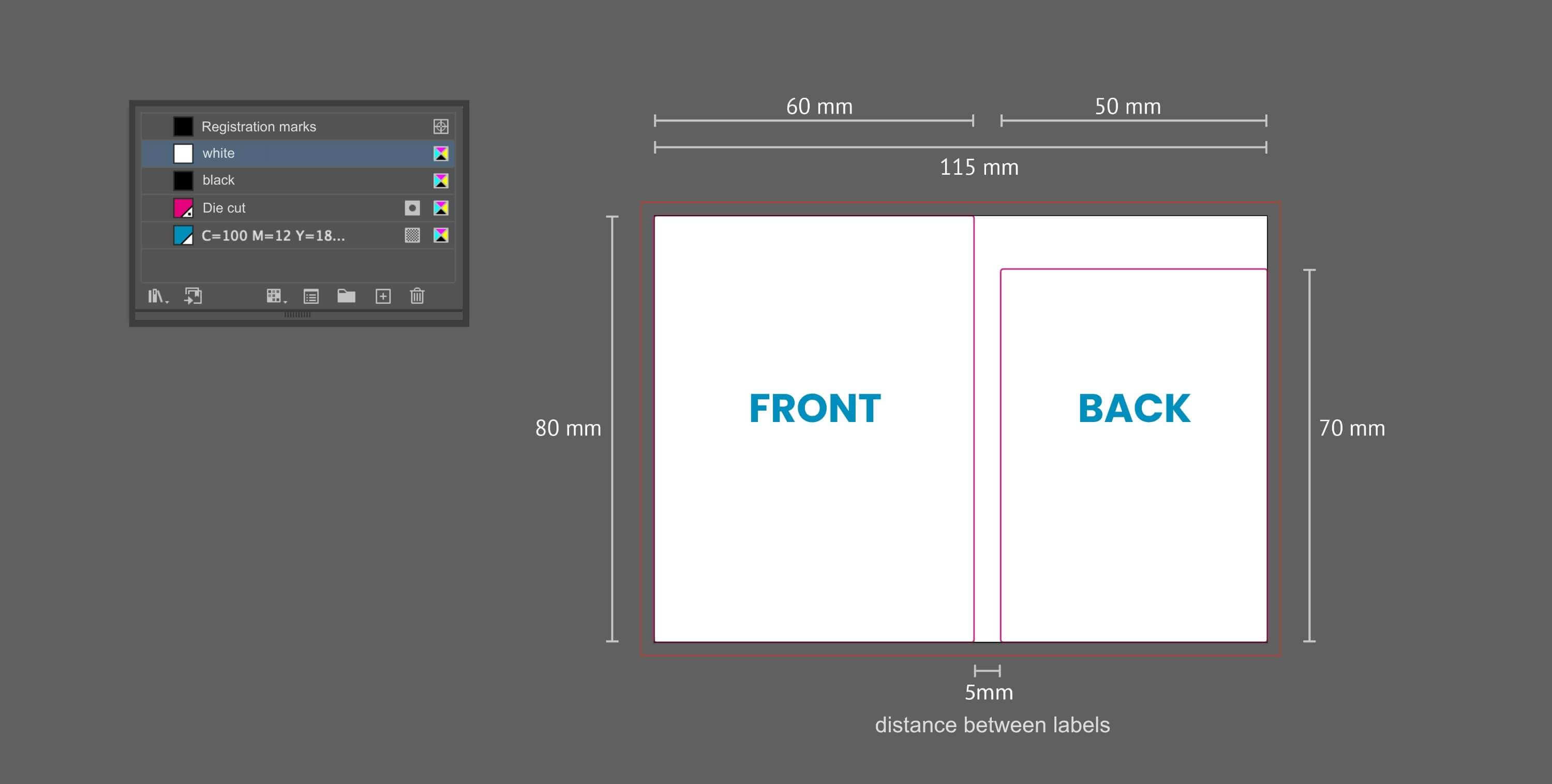
- Create Print File – To print your labels alternately, you must create the front and back labels on a common drawing area. The best way to do this is to use a design program such as Adobe Illustrator.
- Define width and height – Add the two widths of the front and back label. This gives you the final width of the entire document. You must also include an intermediate cut, which varies from customer to customer. The height of the document is determined by the highest height of the front and back label. Example: Your front label is 90 mm wide and your back label is 80 mm wide. Calculation of the width: 90 mm+80 mm+5 mm (intermediate cut) = 175 mm. Your front label is 100 mm high, your back label 90 mm high. The height of the document should therefore be 100 mm (highest height).
- Label Alignment – The orientation of labels side by side depends on how they will be applied to the product in the subsequent finishing process.
- Artwork Assistant – For better understanding, you can use our artwork assistant.
Please note: Since alternating labels are created in one print file, they are considered one label design. For example, if you enter 1,000 pieces in terms of quantity in our online calculator you will receive 1,000 front and 1,000 back labels, as created in the print file.
Example of a Printing File
Creating Correct Printing Data
Correct print data is the be-all and end-all when printing labels. To ensure that nothing goes wrong when creating your print data, our artwork centre will help you.
There you will find, for example, our artwork correction services, where we check and professionally adjust your print data. The design service offers you the possibility of having a professional label designed by one of our graphic designers. With the artwork assistant, you can create a correct PDF template for your print file and in our tutorials, we explain, among other things, how to apply hot foil correctly. You can find a leaflet with all the important information on the correct creation of print data under the tab print data delivery.
If you still have questions about print data, you can of course contact our customer service at any time.
Sophisticated and Colour-Intensive Finishes
Finish your labels additionally with a hot foil, blind embossing or film lamination. Finishing options are a must for all businesses that want to make their labels true eye-catchers.
Calculate and Order Online
At label.co.uk, you can easily calculate and order your labels yourself using the online calculator. If you are unfamiliar with the calculator, look at our step-by-step explanation of how to use it.
We Are Happy to Help You
We will be happy to assist you in creating the correct printing data or navigating the ordering process. You can reach us by telephone on +44 (0) 203 588 1080 or by email: info@label.co.uk.
Our Services
Sample Book
You can order your free sample book, containing pre-cut labels on our standard materials. This will allow you to explore the materials and finishes available at label.co.uk.
Proofing Service
Choose one of our proofing service options. We will print your label under the same conditions as the final print run. This allows you to check the print result and make sure that your label or substrate is well-suited to your needs.
Artwork Service
Not sure if your print files are correct? Take a look at our artwork service and we will check your files, depending on the package you chose, to correct and prepare them for printing. Your labels will then look exactly as you want them to.